
Buy a better media package.
Pay at close with Titus.
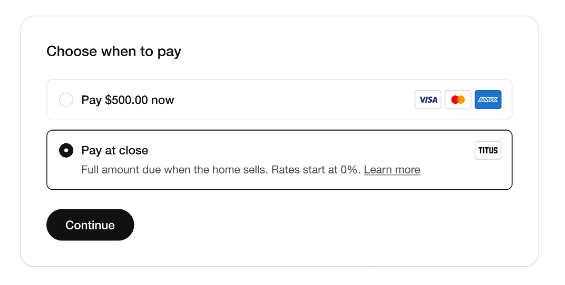
We’re excited to offer agents the ability to defer the cost of any media package until your listing sells. Simply select “Pay at Close” at checkout using Titus.
Differentiate your listings with complete, high-impact media without paying upfront
Align your cash flow by paying when you get your commission
Win more listings by presenting a premium marketing
plan with no out-of-pocket cost
Repay when the listing sells or six months after the first disbursement
How It Works
Place your order
Select ‘Pay at Close’
Create your account and agree to terms
Payment is made at closing through escrow or by debit card
There is no impact to your credit, and rates start at 0%.
Have Questions?
Getting Started
-
You can apply when checking out.
At the payment screen, choose Pay $0 Now
Enter a phone # to sign up
Complete a short application
Once approved, complete your purchase
-
No. Titus only performs a soft credit check during the application process, so there’s no impact on credit score when applying or using funds. Your credit will only be impacted if you fail to repay Titus when funds are due.
-
Active real estate license in the state
Active, signed listing agreement for the subject property
Credit score above limit for your state. Check Here.
-
1.5% of list price, up to $20,000. Once approved, you can use as little or as much as you’d like. You will only pay back the amount you use plus your pay at close fee.
-
Fees range from 0-8.5%.
Example: You qualify for a pay at close rate of 4%. You spend $1000. The repayment amount will be $1000 + 4% flat fee ($40) = $1040.
-
Yes! You can log into your Titus account at www.gotitus.com with the phone number you originally signed up with. Once in your Titus dashboard, you can pay for other listing prep such as staging, painting, repairs, and marketing.
Repayment
-
When you choose to pay at close with Titus, you are starting a loan that will be due at the earliest of the following:
The home sells
The listing is canceled or withdrawn
Six months have passed since the first disbursement date
-
Once the home goes into contract, you’ll add the contact information for the company handling the closing. To add closing details:
Go to your Titus account at www.gotitus.com
Log in with the phone # you originally used to sign up
Click the button that says “Add closing info”
Add details for the title, escrow, or attorney handling your closing
Once this is received, a payoff invoice will automatically be mailed to the closing team.
-
Yes, you can repay at any time through your Titus account.
Log in to your account at www.gotitus.com
Click on Repay Now
Follow the prompts to repay by ACH or debit card.
There are no prepayment penalties for repaying your loan prior to the close date.
-
If the home hasn’t sold by the time funds are due, you can either repay, or you can go on a payment plan to pay over time.
-
If you default on the loan or fail to repay, Titus may report the delinquency to credit bureaus, which could negatively affect your credit.

© Copyright 2026 STAG Media RVA LLC
All STAG Media Idaho LLC drone pilots are
FAA Part 107 Certified

We use cookies and analytics tools to improve your experience. By continuing to browse, you agree to our use of cookies. For details on how we handle your data, see our Privacy Policy.